To check your balance via SMS:
1.Go to Messages and create a "New Message".
2.Type the word "balance".
3Send to 200.
4.Await response from Safaricom confirming your balance.
Alternatively;dial *544*7#
Showing posts with label mpesa. Show all posts
Showing posts with label mpesa. Show all posts
Monday, July 31, 2017
Thursday, July 27, 2017
HOW TO GET MPESA STATEMENT
Simply follow the steps below(its free);
1.dial *234#
2.choose option 2 (my MPESA products)
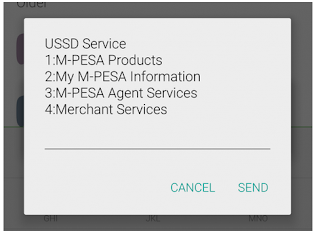 3.choose option 1(M-pesa statement)

4.choose option 1(Full statement)

5.You will be asked to register by entering National ID or any other document you used to register M-Pesa
6.Then you will be asked to enter your email address.
7.Incase of any question contact safaricom customer care via CALL 100
1.dial *234#
2.choose option 2 (my MPESA products)
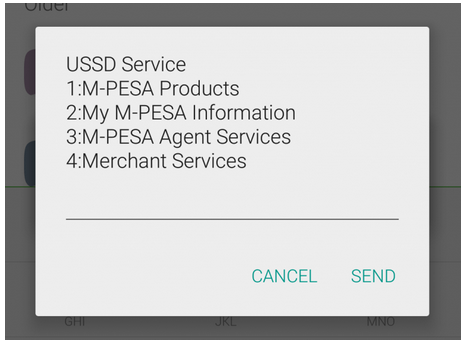

4.choose option 1(Full statement)

5.You will be asked to register by entering National ID or any other document you used to register M-Pesa
6.Then you will be asked to enter your email address.
7.Incase of any question contact safaricom customer care via CALL 100
Wednesday, July 26, 2017
HOW TO TRANSFER MONEY FROM MPESA TO A KCB ACCOUNT
1.Go to your M-PESA menu,
2.Select Lipa na M-PESA,
3.Enter PayBill number 522522,
4.Enter the KCB account number you are transferring money to, enter the amount, and your M-PESA PIN and confirm to send money.
Monday, January 12, 2015
HOW TO PAY GO TV BILL VIA MPESA
1. Go to Mpesa menu and choose 'Lipa na Mpesa' then choose 'Pay Bill'
2. Key in the GOTV Paybill number which is 423655
3. Key in your IUC number;
4. Key in the correct amount for the package you wish to pay for.
5.Key in your M-Pesa PIN
6. Check again to ensure that you have input the correct information
7. Wait for a confirmation message
2. Key in the GOTV Paybill number which is 423655
3. Key in your IUC number;
4. Key in the correct amount for the package you wish to pay for.
5.Key in your M-Pesa PIN
6. Check again to ensure that you have input the correct information
7. Wait for a confirmation message
Subscribe to:
Posts (Atom)